File uploader
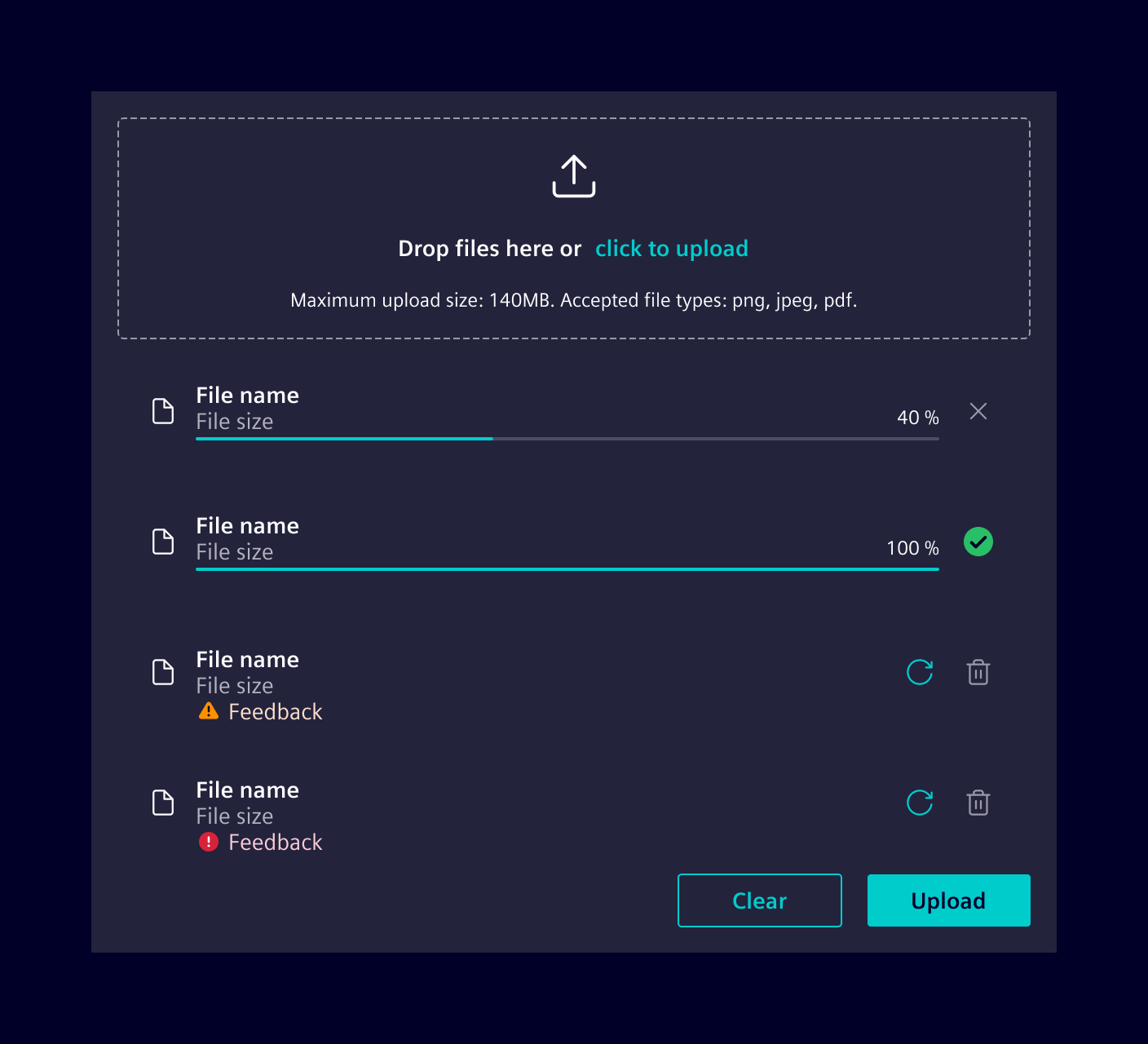
The file uploader component allows users to upload one or more files, such as images, documents or firmware. It shows the upload progress as well as a success/error status after an upload finishes.
Usage
The file uploader allows to upload file-based content. They are typically integrated in forms but can also be used in a standalone fashion.
Users can upload files by dragging and dropping them into the designated drop area. Alternatively, users can also use a browser's/OS' native file selection dialog by clicking the upload link within the drop zone.
Design
Elements
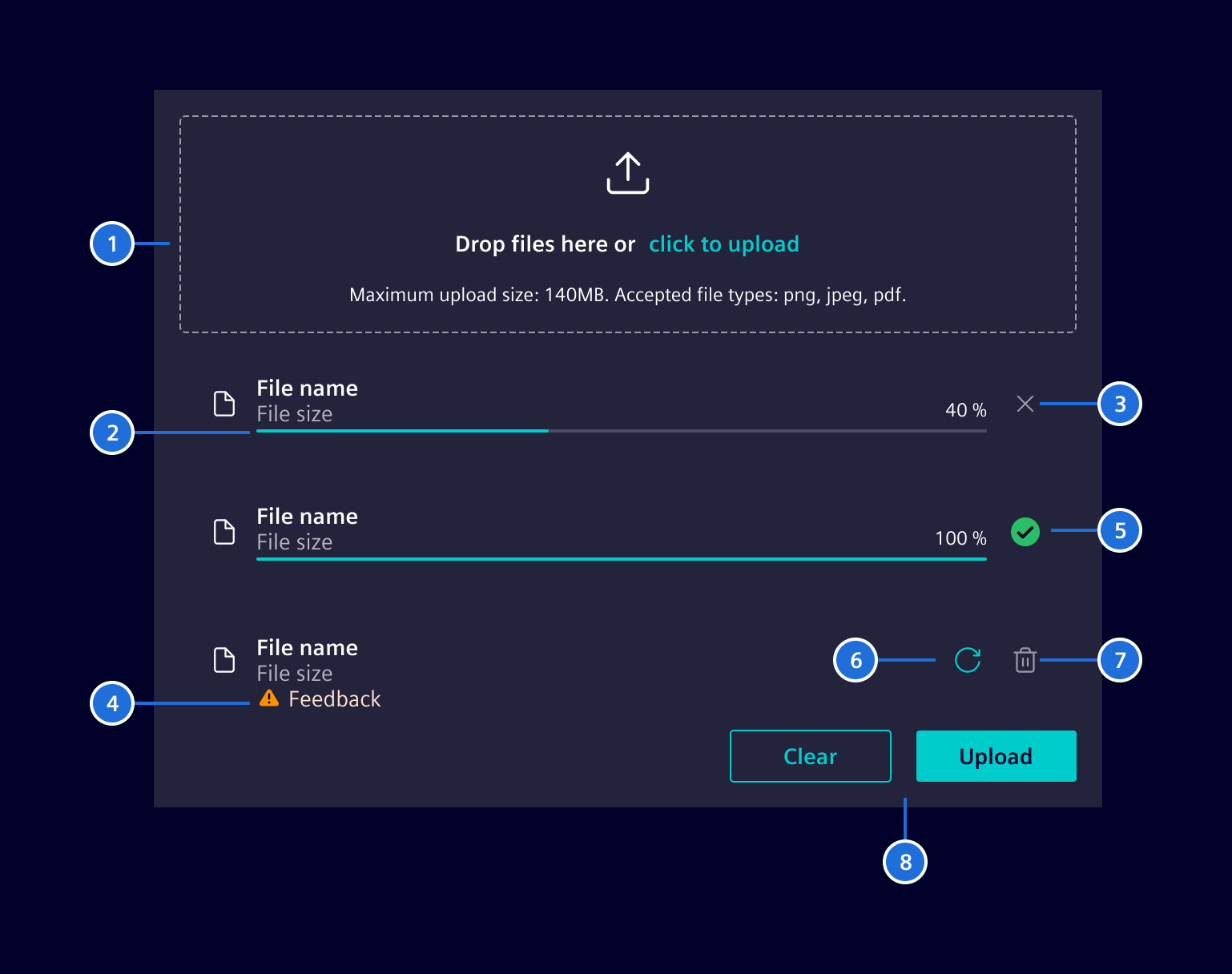
\1. File selector/drop zone, 2. File upload progress, 3. Cancel file upload button, 4. Upload issue feedback, 5. Upload successful icon , 6. Retry button, 7. Delete file button, 8. Actions (optional)
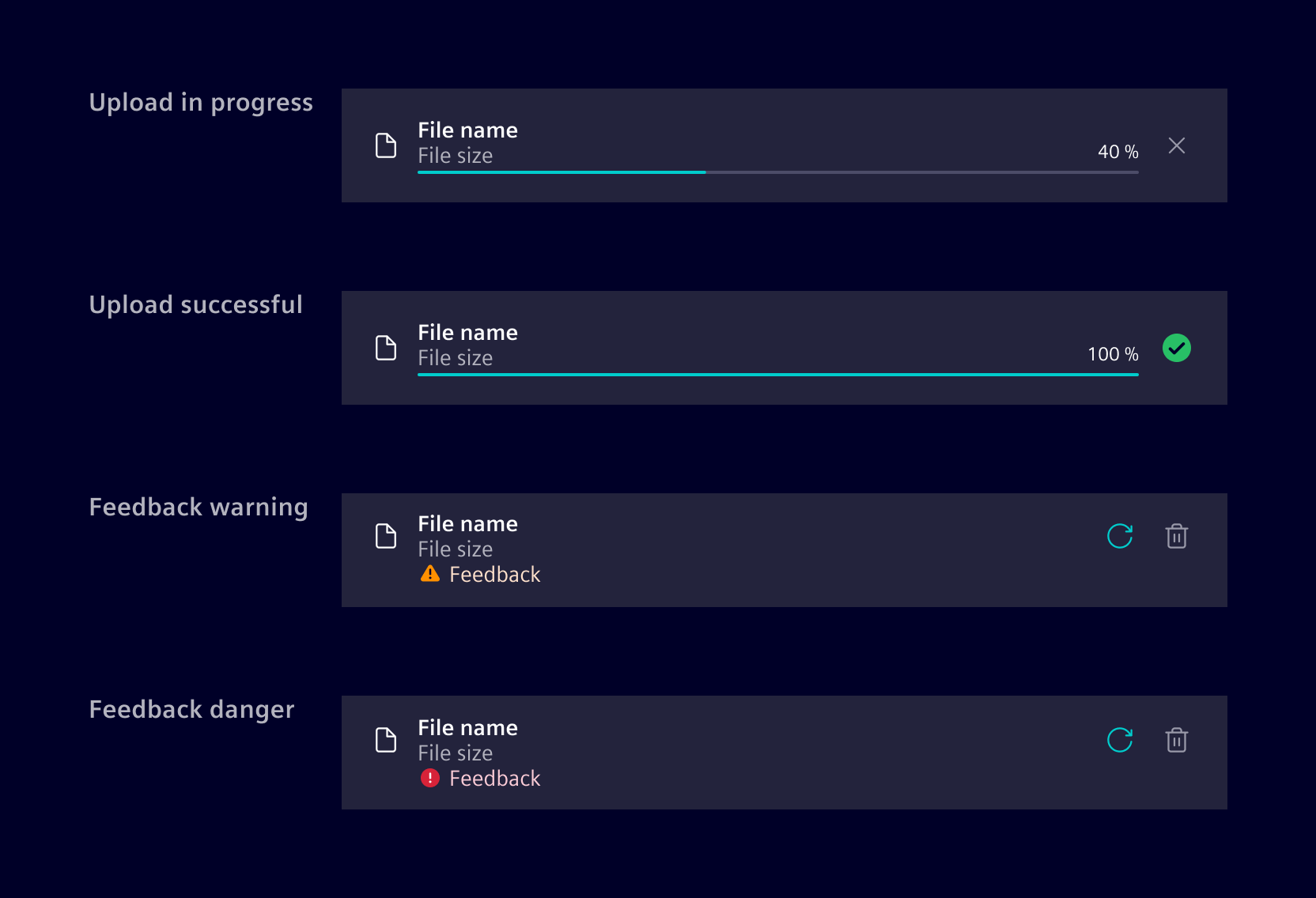
Upload states
Variants
The file uploader is available in two variants, either as just the file selector alone without any status or interaction controls or as the complete variant with file list and all other state management handling.
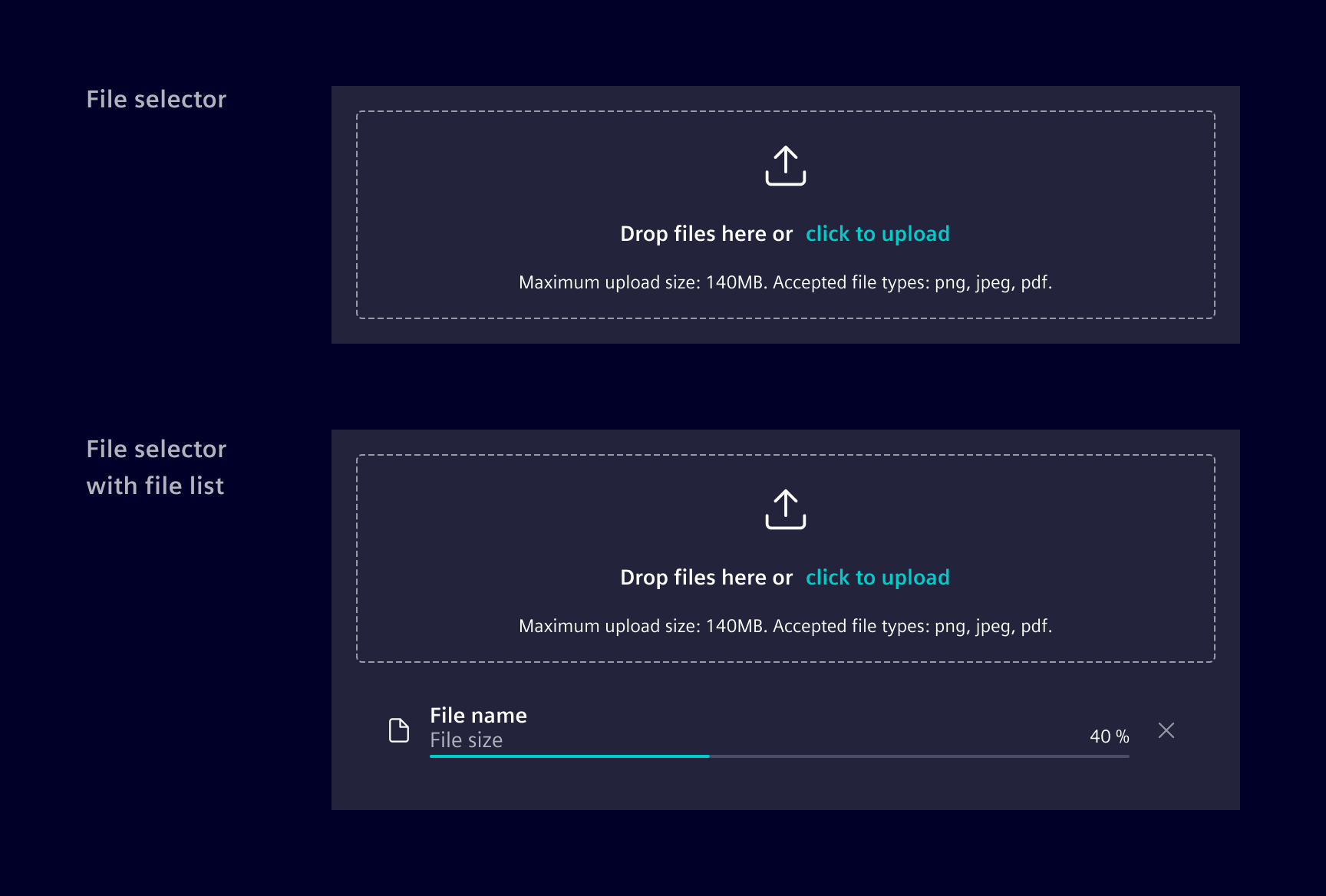
The component can be set to either a fixed height or it supports a dynamically growing one to accommodate a longer list of uploaded files. When set to a fix height, the additional files might be hidden and users have to scroll to see them.
Code
This component can be used to upload a file. Either via file browser or using drag and drop. It also shows you if the upload was successful or has failed. In the case that it was successful, you will be provided with the output emitter uploadFinished.
Usage
import { SiFileUploaderComponent } from '@siemens/element-ng/file-uploader';

@Component({
  imports: [SiFileUploaderComponent, ...]
})
It's also possible to have only the file selector / drop zone part without the file list.
SiFileUploaderComponent API Documentation
si-file-uploader Input Properties
| Name | Type | Default | Description |
|---|---|---|---|
| accept ¶ | string | Define which file types are suggested in file browser. See https://developer.mozilla.org/en-US/docs/Web/HTML/Element/input/file#attr-accept | |
| acceptText ¶ | TranslatableString | $localize`:@@SI_FILE_UPLOADER.ACCEPTED_FILE_TYPES:Accepted file types: {{accept}}.` | Text for the accepted file types. |
| autoUpload ¶ | boolean | false | Auto-upload mode - automatically start upload once files are added. |
| cancelButtonText ¶ | TranslatableString | $localize`:@@SI_FILE_UPLOADER.CANCEL:Cancel` | Text of cancel button. Shown during upload. Required for a11y. |
| clearButtonText ¶ | TranslatableString | $localize`:@@SI_FILE_UPLOADER.CLEAR:Clear` | Text used inside the clear button. |
| directoryUpload ¶ | boolean | false | Enable directory upload mode. When enabled, the file input will accept directories and upload all files within as a flat list. The hierarchy of the directory will not be preserved. The maxFiles property will have no effect when directoryUpload is enabled.Note: This feature is not yet available for safari (iOS) |
| disableUpload ¶ | boolean | false | Disable the upload button. |
| errorTextFileMaxSize ¶ | TranslatableString | $localize`:@@SI_FILE_UPLOADER.ERROR_FILE_SIZE_EXCEEDED:Max. {{maxFileSize}}` | Message or translation key if file exceeds the maximum file size limit. |
| errorTextFileType ¶ | TranslatableString | $localize`:@@SI_FILE_UPLOADER.ERROR_FILE_TYPE:Invalid file type` | Text shown to indicate that an incorrect file type was added to file list. |
| errorUploadFailed ¶ | TranslatableString | $localize`:@@SI_FILE_UPLOADER.UPLOAD_FAILED:Upload failed` | Text shown if the upload failed. |
| maxConcurrentUploads ¶ | number | 3 | Maximum number of concurrent uploads. |
| maxFiles ¶ | number | 10 | Define maximal allowed number of files. When directoryUpload is enabled, this will have no effect. |
| maxFileSize ¶ | number | undefined | Define maximal allowed file size in bytes. |
| maxFileSizeText ¶ | TranslatableString | $localize`:@@SI_FILE_UPLOADER.MAX_SIZE:Upload max. {{maxFileSize}}` | Text to describe the maximum file size. |
| maxFilesReachedText ¶ | TranslatableString | $localize`:@@SI_FILE_UPLOADER.MAX_FILE_REACHED:Max. {{maxFiles}} files` | Error message shown when the maximum number of files are reached. |
| removeButtonText ¶ | TranslatableString | $localize`:@@SI_FILE_UPLOADER.REMOVE:Remove` | Text shown to remove a file from the file list. Required for a11y. |
| retries ¶ | number | 0 | Numbers of retries for failed uploads. |
| showHttpError ¶ | boolean | false | On failed upload, show the error received from the server. |
| successTextTitle ¶ | TranslatableString | $localize`:@@SI_FILE_UPLOADER.UPLOAD_COMPLETED:Upload completed` | Text shown if the upload was successful. |
| uploadButtonText ¶ | TranslatableString | $localize`:@@SI_FILE_UPLOADER.UPLOAD:Upload` | Text used inside the upload button. |
| uploadConfig ¶ | FileUploadConfig | { headers: new HttpHeaders({ 'Accept': 'application/json' }), method: 'POST', url: '', fieldName: 'upload_file', responseType: 'json' } | Config for HTTP request to upload file. |
| uploadDropText ¶ | TranslatableString | $localize`:@@SI_FILE_UPLOADER.DROP:Drop files here or click to upload` | Text instructing a user to drop the files inside the dropzone. |
| uploadingText ¶ | TranslatableString | $localize`:@@SI_FILE_UPLOADER.UPLOADING:Uploading` | Text shown during the file upload. |
Output Properties
| Name | Type | Description |
|---|---|---|
| filesChanges ¶ | UploadFile[] | Output which fires whenever new files are added to or removed from the uploader. |
| uploadCanceled ¶ | UploadFile | Emits when a user press cancel during upload. The event provides the file details. |
| uploadCompleted ¶ | FileUploadResult | Output callback event will provide you if upload is finished. If an error occurred it will be emitted. |
Attributes and Methods
| Name | Type | Default | Description |
|---|---|---|---|
| fileUpload(...) ¶ | (doRetry: boolean = true) => void | Uploads the file Parameters
| |
| reset(...) ¶ | (emit: boolean = true) => void | Reset the state. Parameters
|
SiFileDropzoneComponent API Documentation
si-file-dropzone Input Properties
| Name | Type | Default | Description |
|---|---|---|---|
| accept ¶ | string | Define which file types are suggested in file browser. See https://developer.mozilla.org/en-US/docs/Web/HTML/Element/input/file#attr-accept | |
| acceptText ¶ | TranslatableString | $localize`:@@SI_FILE_UPLOADER.ACCEPTED_FILE_TYPES:Accepted file types: {{accept}}.` | Text or translation key for accepted types. |
| directoryUpload ¶ | boolean | false | Enable directory upload. |
| errorTextFileMaxSize ¶ | TranslatableString | $localize`:@@SI_FILE_UPLOADER.ERROR_FILE_SIZE_EXCEEDED:Max. {{maxFileSize}}` | Message or translation key if file exceeds the maximum file size limit. |
| errorTextFileType ¶ | TranslatableString | $localize`:@@SI_FILE_UPLOADER.ERROR_FILE_TYPE:Invalid file type` | Text or translation key of message title if incorrect file type is dragged / dropped. |
| maxFileSize ¶ | number | Define maximal allowed file size in bytes. | |
| maxFileSizeText ¶ | TranslatableString | $localize`:@@SI_FILE_UPLOADER.MAX_SIZE:Upload max. {{maxFileSize}}` | Text or translation key for max file size. |
| multiple ¶ | boolean | false | Defines whether the file input allows selecting multiple files. When directoryUpload is enabled, this will have no effect. |
| uploadDropText ¶ | TranslatableString | $localize`:@@SI_FILE_UPLOADER.DROP:Drop files here or click to upload` | Text or translation key of the drag&drop field. |
Output Properties
| Name | Type | Description |
|---|---|---|
| fileError ¶ | FileUploadError | Event emitted when file validation errors occur, including files that were ignored due to size or type. |
| filesAdded ¶ | UploadFile[] | Event emitted when valid files are added. Invalid files are also included here, but with status 'invalid' and an errorText describing why they were ignored. |
Attributes and Methods
| Name | Type | Default | Description |
|---|---|---|---|
| reset() ¶ | () => void | Reset all the files inside the native file input (and therefore the dropzone). |
Types Documentation
| Represents a translatable string. This can either be a translation key, e.g. ACTIONS.EDIT that will be automatically translated when displayed on the UI or a pre-translated string, e.g. Edit . Equivalent to a normal string in usage and functionality. |
|---|
| | |||||||||
|---|---|---|---|---|---|---|---|---|---|
|
| | ||||||||
|---|---|---|---|---|---|---|---|---|
|
| The FileUploadResult is emitted at completion of the file uploading via the uploadCompleted emitter. On success the Http response from the backend is provided and on failure, the error object is available. | ||||
|---|---|---|---|---|
|
| | ||||||||
|---|---|---|---|---|---|---|---|---|
|
| Directive for handling file uploads with validation for file type and size. Example: | |||||||||||||||||||||||||||||||||||||||||||||
|---|---|---|---|---|---|---|---|---|---|---|---|---|---|---|---|---|---|---|---|---|---|---|---|---|---|---|---|---|---|---|---|---|---|---|---|---|---|---|---|---|---|---|---|---|---|
| |||||||||||||||||||||||||||||||||||||||||||||
| |||||||||||||||||||||||||||||||||||||||||||||
|
Except where otherwise noted, content on this site is licensed under MIT License.