Markdown
The Markdown component displays formatted Markdown content using Element styles.
Usage
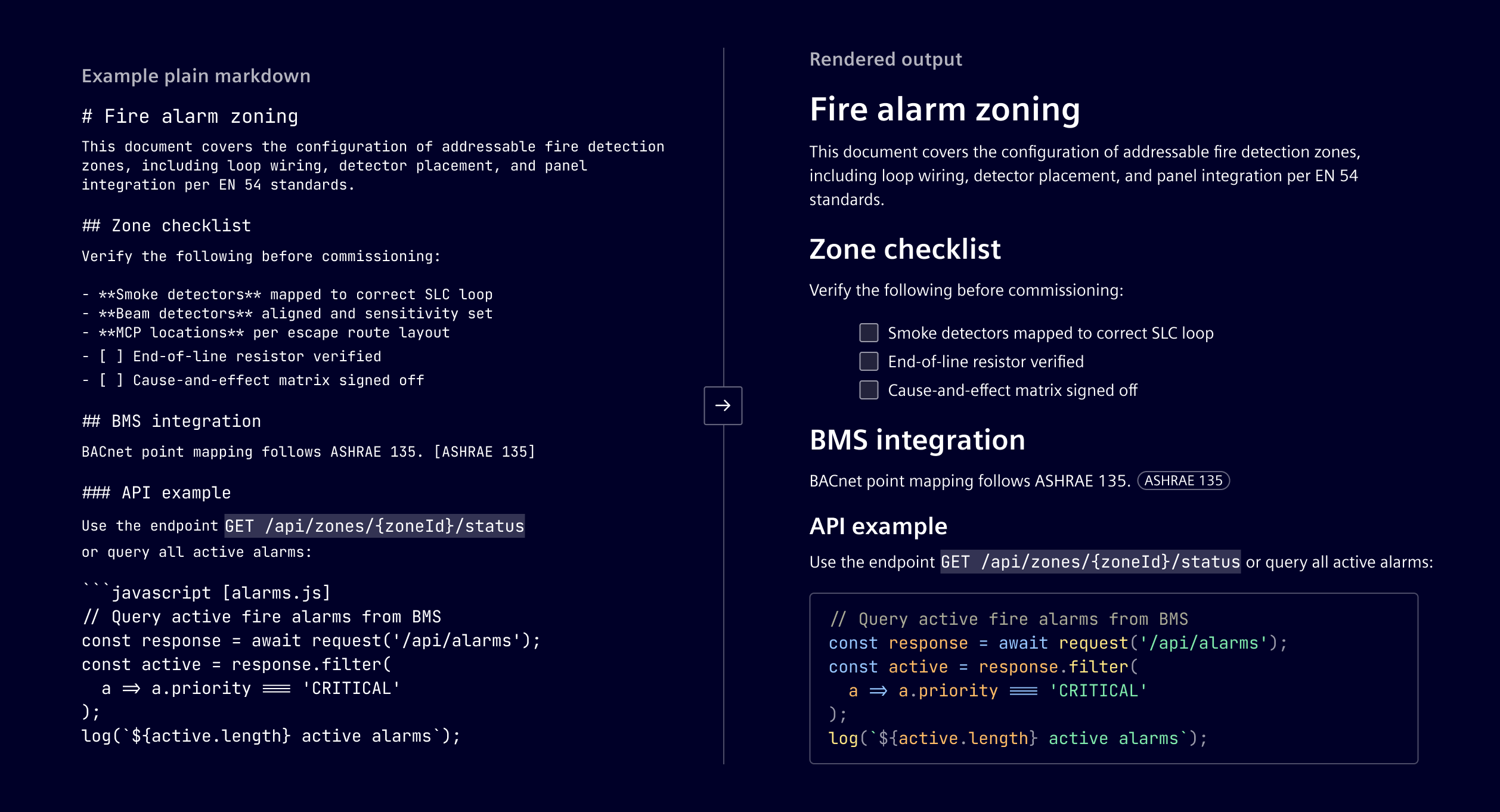
Markdown is a plain text formatting syntax where structure is written with ordinary characters: # for a heading, **text** for bold, - for a list item, etc.
The component maps these elements to Element text styles and spacing, ensuring rendered content is consistent with the rest of the product.
Optional features such as syntax highlighting, diagrams, math, and custom renderers can be enabled when needed.
When to use
- For AI/chat responses
- Rich text from users, such as comments, descriptions, and documentation
- For generated content such as reports, summaries, instructions, and release notes
- Imported Markdown content, such as .md files or Markdown based documentation
Code
Note: The markdown component is currently experimental and may undergo changes in future releases.
The si-markdown component renders Markdown content as Angular components. Use its options to configure extensions, code highlighting, and custom rendering behavior. Options can, and where possible should, be shared between multiple component instances.
Create the options once and pass the same instance to each si-markdown component that needs the configuration. The component supports GitHub Flavored Markdown by default, including tables, task lists, strikethrough, and autolinked URLs.
import { Component, signal } from '@angular/core';
import { makeSiMarkdownOptions, SiMarkdownComponent } from '@siemens/element-ng/markdown';
import { siMarkdownMathKaTeX } from '@siemens/element-ng/markdown/extensions/katex';
import { siMarkdownMermaid } from '@siemens/element-ng/markdown/extensions/mermaid';
import { siMarkdownHighlightJs } from '@siemens/element-ng/markdown/hightlighter/highlightjs';
import remarkGemoji from 'remark-gemoji';

@Component({
  imports: [SiMarkdownComponent],
  template: ` <si-markdown [markdown]="markdown()" [options]="markdownOptions" /> `
})
export class MarkdownExampleComponent {
  protected readonly markdown = signal('# Release notes');
  protected readonly markdownOptions = makeSiMarkdownOptions()
    .setCodeHighlighter(siMarkdownHighlightJs({ autoDetectLanguage: true }))
    .installExtension(siMarkdownMathKaTeX())
    .installExtension(siMarkdownMermaid())
    .installUnifiedPlugin(remarkGemoji);
}
Code highlighting
Configure syntax highlighting for fenced code blocks with siMarkdownHighlightJs() and .setCodeHighlighter(). The highlighter includes JavaScript, TypeScript, JSON, CSS, SCSS, Bash, Python, and XML languages (also HTML) by default.
Use languageLoader to load other languages only when a code block requests them. The loader receives the language name from the fence and returns the corresponding Highlight.js language module. Return undefined for languages your application does not support.
import {
  siMarkdownHighlightJs,
  type HighlightJSLanguageImport
} from '@siemens/element-ng/markdown/hightlighter/highlightjs';

const highlightJsLanguageLoader = async (language: string): HighlightJSLanguageImport => {
  switch (language) {
    case 'c':
      return import('highlight.js/lib/languages/c');
    case 'cpp':
      return import('highlight.js/lib/languages/cpp');
    case 'yaml':
      return import('highlight.js/lib/languages/yaml');
    default:
      return undefined;
  }
};

protected readonly markdownOptions = makeSiMarkdownOptions().setCodeHighlighter(
  siMarkdownHighlightJs({ languageLoader: highlightJsLanguageLoader })
);
When autoDetectLanguage is enabled, Highlight.js can only detect languages that have already been registered; it does not invoke languageLoader. Eagerly register every language you want to auto-detect, following the built-in language registration used by the Highlight.js component:
import hljs from 'highlight.js/lib/core';
import langYaml from 'highlight.js/lib/languages/yaml';

hljs.registerLanguage('yaml', langYaml);

protected readonly markdownOptions = makeSiMarkdownOptions().setCodeHighlighter(
  siMarkdownHighlightJs({ autoDetectLanguage: true })
);
Extensions
The following rendering support is included in every Markdown component:
| Rendering support | Purpose |
|---|---|
| GitHub Flavored Markdown | Parses tables, task lists, strikethrough, and autolinked URLs. |
| Inline HTML | Renders sanitized inline HTML. |
| Code blocks | Renders fenced code blocks without syntax highlighting. |
Optional integrations are configured through SiMarkdownOptions:
| Integration | Configuration | Purpose |
|---|---|---|
| KaTeX | .installExtension(siMarkdownMathKaTeX()) | Parses and renders inline and block LaTeX math expressions. It accepts optional remark-math parser and KaTeX rendering options. |
| Mermaid | .installExtension(siMarkdownMermaid()) | Renders fenced code blocks declared as mermaid as diagrams. It accepts optional Mermaid configuration. |
| Highlight.js | .setCodeHighlighter(siMarkdownHighlightJs()) | Adds syntax highlighting to fenced code blocks. It accepts Highlight.js options, including automatic language detection. |
| Gemojis | .installUnifiedPlugin(remarkGemoji) | Converts emoji shortcodes such as :rocket: to emoji. |
You can also add a compatible unified or remark plugin with .installUnifiedPlugin(plugin, options). This is useful for syntax that is not covered by the Element integrations, such as emoji shortcodes.
Bundle size: KaTeX, Mermaid, Highlight.js, and additional
unifiedplugins increase the application bundle size. Import and configure only the integrations your Markdown content requires.
Mermaid security considerations
Keep Mermaid configuration in trusted application code. When rendering diagrams from users, external services, or AI-generated responses, keep the default securityLevel: 'strict'.
The Mermaid integration uses shared global configuration: options passed to siMarkdownMermaid() can affect other diagram renders using the same Mermaid instance. Separate si-markdown components or options objects do not provide configuration isolation. Use a consistent strict configuration throughout the application, and do not mix permissive Mermaid configuration with untrusted diagram rendering. Do not rely on Angular's HTML sanitization to compensate for permissive settings: the integration trusts Mermaid's generated SVG output.
KaTeX security considerations
Keep the default trust: false when rendering expressions from users, external services, or AI-generated responses. This setting disables commands that can create links, load external images, or add HTML attributes.
Do not set trust: true unless all expressions rendered with that configuration come from sources you fully trust, such as application-controlled content. Do not enable it for user-provided, externally supplied, or AI-generated expressions. If specific commands are required for untrusted expressions, use a narrowly scoped trust callback that validates both the command and its arguments, including URLs. Keep KaTeX configuration in trusted application code. KaTeX renders directly into the DOM, so Angular's HTML sanitization does not provide an additional safeguard for these settings.
Directives
Directives add named, component-backed elements to Markdown. The renderer supports the directive syntax provided by remark-directive: inline directives use :name[label]{attributes}, leaf directives use ::name{attributes}, and container directives wrap Markdown content with matching colon fences, at least three colons.
:::name{attribute=value attribute2=value2}
Normal **Markdown** content.
:::
Register a directive handler with registerDirective(). A handler maps a directive name to an Angular component that implements SiMarkdownExtensionComponent; that component receives the parsed directive node, its parent, and any registered options as signal inputs.
Example:
::notice{message="Scheduled maintenance starts at 22:00."}
import { Component, input } from '@angular/core';
import {
  makeSiMarkdownOptions,
  type SiMarkdownDirectiveNode,
  type SiMarkdownExtensionComponent
} from '@siemens/element-ng/markdown';
import { type Node, type Parent } from 'mdast';

@Component({
  selector: 'si-markdown-notice',
  template: '<div class="notice">{{ node().attributes.message }}</div>'
})
class MarkdownNoticeComponent implements SiMarkdownExtensionComponent {
  readonly node = input.required<SiMarkdownDirectiveNode>();
  readonly parent = input.required<Parent>();
  readonly options = input<unknown>();
}

protected readonly markdownOptions = makeSiMarkdownOptions().registerDirective({
  type: 'notice',
  component: MarkdownNoticeComponent
});
Callout
The callout container directive is integrated by default. Use its optional type attribute to choose a visual severity: success, info, warning, danger, caution, critical, note, or tip. note is the default.
:::callout{type=warning heading="Optional heading"}
This action cannot be undone.
:::
Tabs
The tabset directive is an opt-in directive that adds Element tabset. Register siMarkdownTabsetDirective() to enable the tabset container directive. Its child tab directives map to si-tab; only their heading attribute is used. Use a longer fence for the outer tabset when nesting tab directives.
import { makeSiMarkdownOptions } from '@siemens/element-ng/markdown';
import { siMarkdownTabsetDirective } from '@siemens/element-ng/markdown/directives/tabs';

protected readonly markdownOptions = makeSiMarkdownOptions().registerDirective(
  siMarkdownTabsetDirective()
);
::::tabset{height=12rem}
:::tab{heading="First tab"}
First tab content.
:::

:::tab{heading="Second tab"}
Second tab content.
:::
::::
Supported attribute on ::::tabset is height. It can be any CSS length unit or auto to take up the space needed for the active tab.
Custom extension
An extension can install unified plugin(s) and associate the AST node types produced by that plugin with Angular renderer components. As an example, the following provides an alternative to render LaTeX math expressions. Instead of using KaTeX it uses @webc.site/math. This package is smaller and faster than KaTeX, but can only produce MathML (supported by all major browsers). It is distributed under the MulanPSL-2.0, an OSI approved liberal license.
import remarkMath, { type Options } from 'remark-math';

import { SiMarkdownExtension } from '../../si-markdown.types';
import { SiMarkdownMathComponent } from './si-markdown-math.component';

export const siMarkdownWebcSiteMath = (parseOptions?: Options): SiMarkdownExtension => {
  return {
    plugins: [{ plugin: remarkMath, options: parseOptions }],
    types: [
      { type: 'math', component: SiMarkdownMathComponent },
      { type: 'inlineMath', component: SiMarkdownMathComponent }
    ]
  };
};
The renderer implements SiMarkdownExtensionComponent. Element supplies the parsed node, its parent, and the options provided in the extension definition as signal inputs.
import { Component, computed, inject, input } from '@angular/core';
import { DomSanitizer } from '@angular/platform-browser';
import mathml from '@webc.site/math';
import { Literal, type Node, type Parent } from 'mdast';

import { SiMarkdownExtensionComponent } from '../../si-markdown.types';

@Component({
  selector: 'si-markdown-math',
  template: '',
  host: {
    '[attr.data-line]': 'node().position?.start?.line',
    '[class.d-block]': 'displayMode()',
    '[innerHTML]': 'html()'
  }
})
export class SiMarkdownMathComponent implements SiMarkdownExtensionComponent {
  private readonly sanitizer = inject(DomSanitizer);

  readonly node = input.required<Node>();
  readonly parent = input.required<Parent>();
  readonly options = input<any>();

  protected readonly displayMode = computed(() => this.node().type === 'math');
  protected readonly html = computed(() => {
    const expr = (this.node() as Literal).value;
    const html = mathml(expr, this.displayMode());
    return this.sanitizer.bypassSecurityTrustHtml(html);
  });
}
Register the extension with the component options:
protected readonly markdownOptions = makeSiMarkdownOptions().installExtension(siMarkdownWebcSiteMath());
Example
SiMarkdownComponent API Documentation
si-markdown Component to display markdown text
This component is built using concepts from ngx-remark, namely using Angular templates to render the AST produced by remark .
Unlike ngx-remark , it features a configuration based approach of extensibility so that multiple instances of the component can be used with the same configuration, e.g. inside a chat component w/o repeating templates.
Input Properties
| Name | Type | Default | Description |
|---|---|---|---|
| citations ¶ | SiMarkdownCitation[] | Citation metadata used to create citations. | |
| debug ¶ | boolean | false | Debug mode. When true, unknown node types will be displayed along with the node as JSON. |
| markdown ¶ | string | '' | The markdown text to transform and display |
| options ¶ | SiMarkdownOptions | Options to control rendering. Can be shared across multiple instances. |
Output Properties
| Name | Type | Description |
|---|---|---|
| extensionEvent ¶ | { data: any, name: string } | Emitted by extension components. |
Attributes and Methods
| Name | Type | Default | Description |
|---|---|---|---|
| (readonly) meta ¶ | Signal<SiMarkdownMetadata> | ... | Gives access to metadata in extension components |
Types Documentation
| Citation metadata associated with a markdown response. | |||||||
|---|---|---|---|---|---|---|---|
|
| Options for the markdown renderer. This holds all configuration and allows installing extensions. A number of extensions are already ready to use and shipped with Element. Example: | ||||||||||||||||||||||||||||||
|---|---|---|---|---|---|---|---|---|---|---|---|---|---|---|---|---|---|---|---|---|---|---|---|---|---|---|---|---|---|---|
| ||||||||||||||||||||||||||||||
| ||||||||||||||||||||||||||||||
|
| Options passed to makeProcessor() | ||
|---|---|---|
|
| Definition of a single source | |||||
|---|---|---|---|---|---|
|
| Type handler for a named type. This can be an AST node type, a code type, a directive name | ||||
|---|---|---|---|---|
|
| |
|---|
| Combination of unified plugin with options | |||
|---|---|---|---|
|
| A combination of a component and options passed to it during run-time | |||
|---|---|---|---|
|
| Interface an extension component must implement | ||||
|---|---|---|---|---|
|
| Interface a code highlighter component must implement | |||||
|---|---|---|---|---|---|
|
| Processor import imported from unified |
|---|
| import imported from @types/mdast |
|---|
| Extended root with references |
|---|
| |
|---|
| An extension to the si-markdown component | |||||
|---|---|---|---|---|---|
|
| import imported from @types/mdast |
|---|
| import imported from @types/mdast |
|---|
| Plugin import imported from unified |
|---|
| Transformer import imported from unified |
|---|
| Preset import imported from unified |
|---|
| PluggableList import imported from unified |
|---|
| |
|---|
| import imported from @types/mdast |
|---|
| Extra node for collecting all footnotes | |||||
|---|---|---|---|---|---|
|
| Container for one or more adjacent citation nodes. | |||||
|---|---|---|---|---|---|
|
| AST node created by remark-directive . | |||||||
|---|---|---|---|---|---|---|---|
|
| import imported from @types/mdast |
|---|
| import imported from @types/mdast |
|---|
| import imported from @types/mdast |
|---|
| import imported from @types/unist |
|---|
| Inline node that references an item in the source citation array. | ||||||
|---|---|---|---|---|---|---|
|
Except where otherwise noted, content on this site is licensed under MIT License.